> ## Documentation Index
> Fetch the complete documentation index at: https://docs.influship.com/llms.txt
> Use this file to discover all available pages before exploring further.
# Build a Creator Research App
> Run a complete interface for search, supporting evidence, and saved shortlists.
Build an interface that searches Instagram creators, explains the matches, and saves a selection with your campaign brief and notes.
## Run the example
You need **Node.js 22+** and an API key from the [developer dashboard](https://developers.influship.com). No package installation is required.
1. [Download the example app](https://github.com/Influship/influship-examples/releases/download/v1.1.0/creator-research.zip) and extract it.
2. Open a terminal in the extracted `creator-research` directory.
3. Set your key and start the server:
```bash theme={null}
export INFLUSHIP_API_KEY="your_api_key_here"
node server.mjs
```
Open [http://127.0.0.1:3344](http://127.0.0.1:3344). The browser calls your local server; the server sends your API key to Influship.
The example is MIT licensed. [Browse its source on GitHub](https://github.com/Influship/influship-examples/tree/main/creator-research).
## Search, review, and save
Enter a brief such as “fitness creators who teach practical home workouts” and choose **Find creators**. The app requests up to five results and displays creator names, Instagram handles, available metrics, and match reasons.
Each search costs up to **\$0.35** with API-key billing. An empty search costs **\$0.25**. New API customers receive **500 starter credits**.
Expand **Review supporting evidence** to see post evidence, profile facts, and inferred reasons. Quotes appear when the response supplies them. Results using retrieval fallback are labeled **Discovery candidate**.
Add one to eight Instagram profiles, enter a list name and review notes, then choose **Save shortlist**. Saving uses the free [Shortlists API](/guides/saved-shortlists).
Choose **Load lists**, then open your saved list. Your selected handles, brief, and notes return. The app restores profile references; run another search when you want new candidates.
Your saved list should reappear after restarting the local app with a key from the same API account. Editing and saving a reopened list creates a new list. Use the [saved-shortlist guide](/guides/saved-shortlists) to add version-aware updates or deletion.
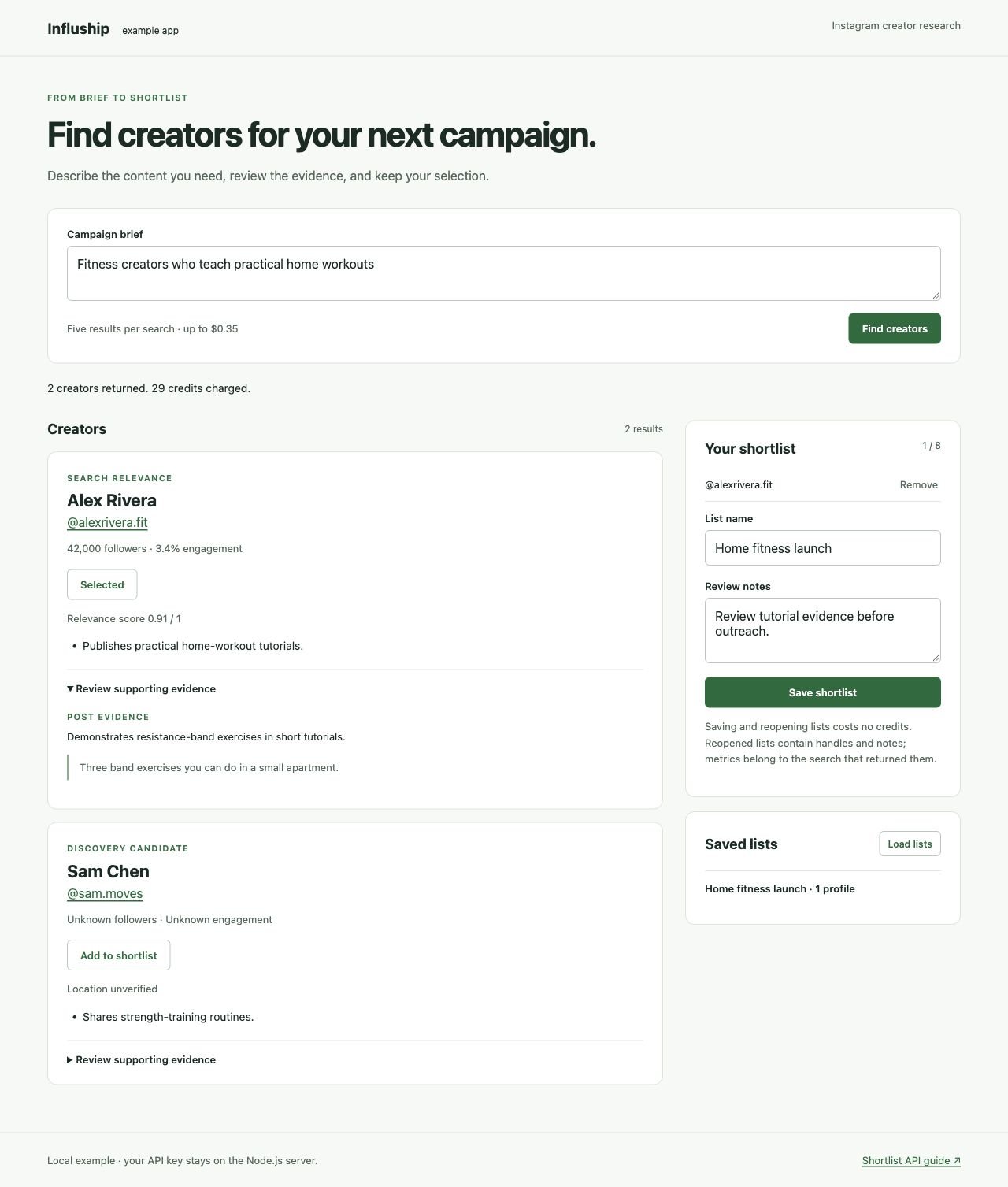 *Example interface with fictional creator data.*
## How the app fits together
| File | Responsibility |
| - | - |
| `server.mjs` | Holds the API key, validates inputs, and calls search and shortlist endpoints |
| `index.html` | Search form, results, selection, and saved-list panels |
| `app.js` | Displays match evidence and manages the selection |
| `styles.css` | Desktop and mobile layouts |
The app preserves unknown metrics, distinguishes retrieval candidates from scored results, and shows evidence provenance. See [Campaign Fit & Evidence](/concepts/match-reasons) for those response fields.
## Handle failed requests
The example surfaces errors without automatically repeating a search or save. If a save has an ambiguous failure, load your saved lists before trying again; the original request could have completed. For billed searches, another request can incur another charge.
For `402`, check your balance in the dashboard. For `429` or temporary service failures, follow [Error Handling](/guides/error-handling) before adding retries.
## Adapt it to your application
Keep Influship requests behind your server boundary. Add your application's authentication, authorize access to saved lists, and set request and spending limits per user before deploying. API keys under one account share its shortlists.
To extend the workflow, add [campaign scoring](/cookbook/score-campaign-fit) for selected creators or [live platform research](/guides/live-platform-data) for their content.
This documentation is built and hosted on [Mintlify](https://mintlify.com), a developer documentation platform.
*Example interface with fictional creator data.*
## How the app fits together
| File | Responsibility |
| - | - |
| `server.mjs` | Holds the API key, validates inputs, and calls search and shortlist endpoints |
| `index.html` | Search form, results, selection, and saved-list panels |
| `app.js` | Displays match evidence and manages the selection |
| `styles.css` | Desktop and mobile layouts |
The app preserves unknown metrics, distinguishes retrieval candidates from scored results, and shows evidence provenance. See [Campaign Fit & Evidence](/concepts/match-reasons) for those response fields.
## Handle failed requests
The example surfaces errors without automatically repeating a search or save. If a save has an ambiguous failure, load your saved lists before trying again; the original request could have completed. For billed searches, another request can incur another charge.
For `402`, check your balance in the dashboard. For `429` or temporary service failures, follow [Error Handling](/guides/error-handling) before adding retries.
## Adapt it to your application
Keep Influship requests behind your server boundary. Add your application's authentication, authorize access to saved lists, and set request and spending limits per user before deploying. API keys under one account share its shortlists.
To extend the workflow, add [campaign scoring](/cookbook/score-campaign-fit) for selected creators or [live platform research](/guides/live-platform-data) for their content.
This documentation is built and hosted on [Mintlify](https://mintlify.com), a developer documentation platform.